
Introduction
When building or scaling infrastructure for a web application, an internal enterprise platform, a machine learning pipeline, or a data processing workflow, one of the earliest and most consequential decisions you'll make is where and how your software actually runs. Three options dominate this space: bare metal servers, virtual machines (VMs), and containers.
These aren't just three flavors of the same thing. They represent fundamentally different philosophies about how compute resources should be allocated, isolated, managed, and consumed. Picking the wrong one for your workload doesn't just cost you money. It can mean poor performance, operational headaches, security gaps, or all three at once.
This article covers all three from the ground up: what they are, how they work under the hood, where they excel, where they fall apart, and how to think about choosing between them in real-world scenarios.
Part 1: Bare Metal
What It Is
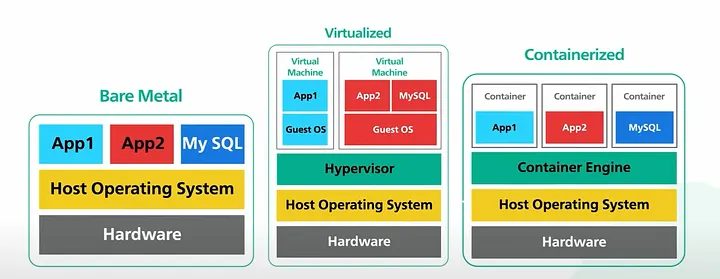
Bare metal refers to a physical server where your application or operating system runs directly on the hardware. No hypervisor, no abstraction layer, no virtualization tax. You get the machine, and you get all of it.
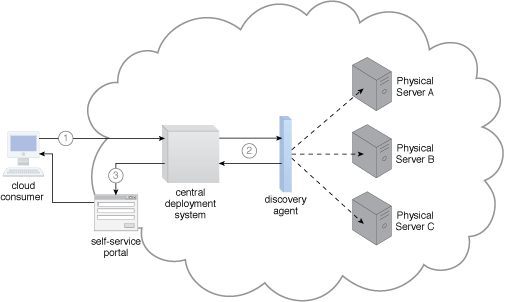
In a cloud context, "bare metal" has evolved to mean dedicated single-tenant physical servers available on-demand from providers like AWS (Bare Metal EC2 instances), IBM Cloud, Hetzner, OVHcloud, and others. In on-premises contexts, it's your own hardware in your own rack.
How It Works
When you boot a bare metal server, the BIOS/UEFI initializes the hardware, the bootloader runs, and your OS kernel loads directly onto the physical machine. There's no intermediary. Your application talks to the OS, the OS talks directly to the hardware drivers, and the hardware responds. The entire CPU, memory, NIC, and storage I/O bandwidth is yours.
This directness is both its biggest strength and its biggest operational constraint.
Where Bare Metal Shines
Raw performance and predictability. There's no hypervisor overhead, no noisy neighbor effect, no shared CPU cycles. For latency-sensitive workloads like high-frequency trading systems, real-time signal processing, and low-latency databases, the difference between bare metal and virtualized infrastructure can be measured in microseconds, and in those domains, microseconds matter enormously.
High I/O throughput. Workloads that hammer disk I/O or network interfaces, such as large-scale database clusters, video transcoding pipelines, or scientific simulations, benefit significantly from direct hardware access. With VMs, storage and network I/O go through an additional software layer. With bare metal, you're hitting the hardware directly.
Licensing and compliance requirements. Certain enterprise software licenses (Oracle Database is the classic example) are tied to physical cores, not virtual cores. Running Oracle on a hypervisor can be a licensing nightmare. Bare metal sidesteps this entirely. Similarly, some compliance frameworks require physical isolation of hardware for data residency or security reasons.
GPU and specialized hardware workloads. While GPU passthrough to VMs has improved, running GPU-intensive ML training or inference directly on bare metal avoids latency and driver complexity. When you need to fully saturate a DGX cluster, bare metal is the right substrate.
Where Bare Metal Falls Short
- Provisioning time. Spinning up a bare metal server, even from a cloud provider, takes minutes to tens of minutes, sometimes longer. A VM or container can be ready in seconds. For workloads that need to scale quickly in response to demand, bare metal is fundamentally slow.
- Resource utilization. Unless your workload fully saturates the machine, you're almost certainly wasting capacity. Bare metal doesn't share well. If your app uses 30% of CPU most of the time, you're paying for and running the other 70% doing very little. This inefficiency is one of the primary economic drivers behind virtualization.
- Operational overhead. OS patching, hardware failures, firmware updates, BIOS configuration, all of this falls on you or your provider. There's more surface area to manage. In cloud environments, your provider handles hardware failures, but you're still responsible for more of the stack than you would be with VMs or containers.
- Density. You can run one workload per physical machine (or carefully partition it yourself). This is the antithesis of modern cloud-native thinking, where you want to maximize resource utilization across a shared pool.
Part 2: Virtual Machines
What They Are
A virtual machine is a software emulation of a physical computer. It includes a full OS, virtualized hardware (CPU, memory, network adapters, disk controllers), and runs on top of a hypervisor, a software layer that sits between the physical hardware and the VMs running on it.
The hypervisor manages the allocation of physical resources across multiple VMs, ensuring isolation between them. Each VM thinks it has its own machine. It doesn't. It's sharing the underlying hardware with other VMs, but the hypervisor makes the deception seamless.
How It Works
There are two types of hypervisors:
Type 1
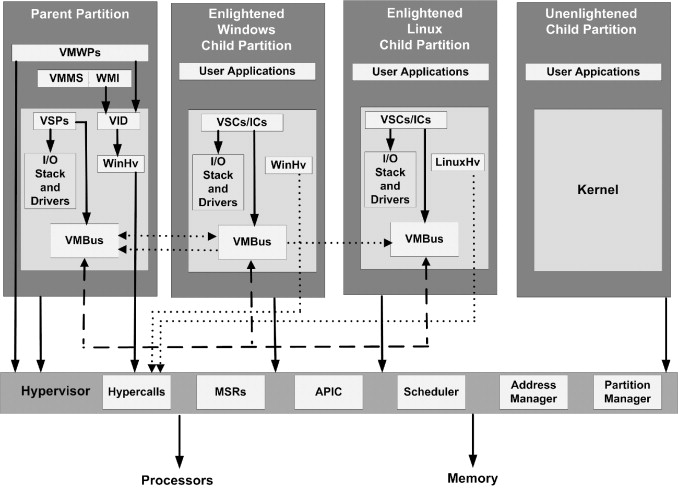
(bare-metal hypervisors) run directly on the physical hardware, with no host OS in between. Examples include VMware ESXi, Microsoft Hyper-V, and the Xen hypervisor. These are the standard in production data center environments.
Type 2
(hosted hypervisors) run as an application on top of a conventional OS. VMware Workstation and Oracle VirtualBox fall into this category. These are fine for development and testing, but not production.
When a VM wants to perform privileged operations like accessing hardware, the CPU traps those instructions and hands control to the hypervisor, which mediates the request. Modern CPUs include hardware virtualization extensions (Intel VT-x, AMD-V) that make this trap-and-emulate process extremely efficient.
Each VM has a guest OS, a full independent kernel. A Linux VM and a Windows VM can run side by side on the same physical host without knowing about each other, each with their own user-space processes, memory space, file system, and network stack.
Where VMs Shine
-
Strong isolation. Because each VM has its own kernel, a security compromise inside one VM doesn't automatically mean a breach of another. "VM escape" is possible but is much harder than container escapes because the attack surface is smaller at the hypervisor boundary. This is why cloud providers use VMs as the primary isolation primitive for multi-tenant compute.
-
Running mixed OS environments. Need to run Windows Server, Ubuntu 22.04, and CentOS 7 on the same physical host? VMs handle this natively. Containers cannot. They share the host OS kernel, so a Linux host can only run Linux containers.
-
Legacy application support. Many enterprise applications are tightly coupled to specific OS versions, kernel configurations, or even hardware characteristics. VMs let you run those legacy environments without touching the underlying hardware. You can snapshot, clone, and move them as needed.
-
Operational maturity. VMware vSphere, Microsoft Azure Stack, OpenStack. The tooling ecosystem around VM management is decades old and extraordinarily mature. Live migration, snapshotting, backup integration, and monitoring tooling are all well-developed.
-
Consistent performance guarantees. You can allocate guaranteed CPU and memory reservations to a VM, ensuring it always gets its committed resources regardless of what's happening on the host.
Where VMs Fall Short
- Boot time. A VM takes time to boot because it needs to initialize a full OS: kernel, daemons, init systems, the works. Typically 30 seconds to a few minutes.
- Resource overhead. Every VM carries the overhead of a full guest OS, typically hundreds of megabytes of RAM plus disk space and CPU for OS processes.
- Image size and sprawl. VM images are large, often gigabytes. Moving, storing, and versioning them is expensive and slow compared to container images.
- Density limitations. Because of OS overhead, you can pack fewer VMs on a physical host than you can containers.
Part 3: Containers
What They Are
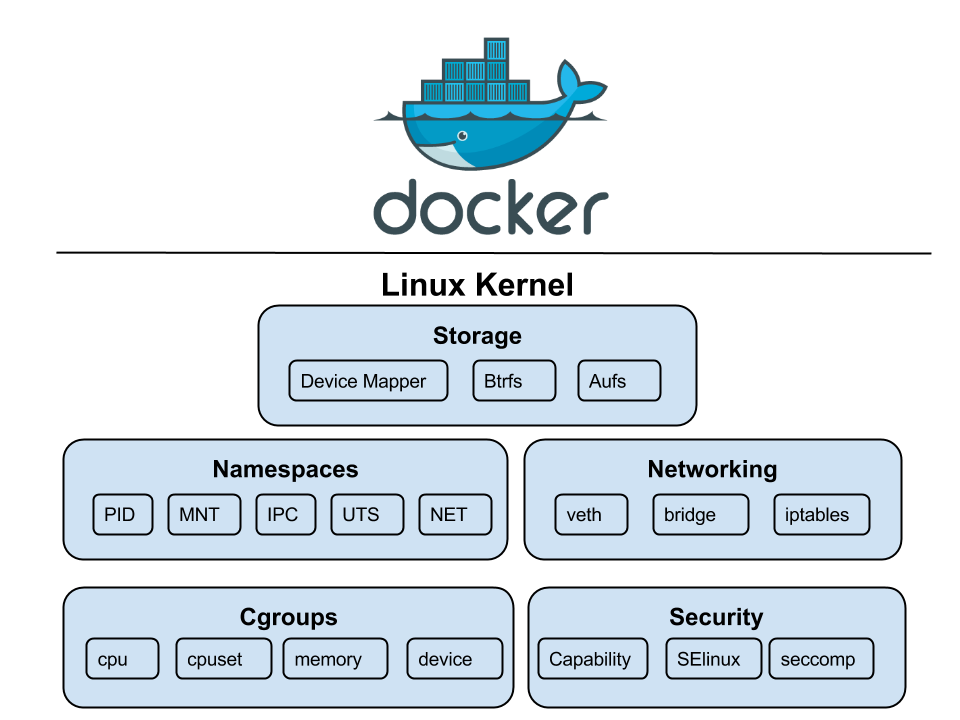
Containers are a method of OS-level virtualization. Unlike VMs, they don't emulate hardware or run a guest OS. Instead, multiple containers share the same host OS kernel, each isolated from the others using Linux kernel features, primarily namespaces and cgroups.
Docker popularized containers in 2013, but the underlying mechanisms (Linux namespaces, cgroups) existed for years before that. Today, the ecosystem includes runtimes like containerd, CRI-O, and Podman, with Kubernetes as the de facto standard for orchestration.
How It Works
Two kernel features do the heavy lifting:
Namespaces provide isolation
Linux has several namespace types: PID namespaces (process isolation), network namespaces (isolated network stacks), mount namespaces (isolated filesystem views), UTS namespaces (hostnames), and more. Together, they create the illusion that a container is an independent machine.
cgroups (control groups) provide resource accounting
They let you say "this container gets at most 2 CPU cores and 512MB of RAM" and have the kernel enforce it. Without cgroups, one rogue container could consume all the resources on a host.
A container image is a read-only filesystem snapshot layered using a union filesystem (like OverlayFS). When you run a container, a thin writable layer is added on top. This layered approach means images share common layers, saving significant disk space and network bandwidth.
Where Containers Shine
Startup speed
Containers start in milliseconds to seconds. There's no OS to boot; the kernel is already running. You're just starting isolated processes.
Density
Pack hundreds of containers on one node. Higher density means fewer hosts for the same workloads, lowering compute costs.
Portability
A container image bundles code, runtime, and libraries. "Works on my machine" translates perfectly to production.
Cloud-native ecosystem
The modern tooling stack (Kubernetes, Helm, Istio) is built entirely around containers.
Where Containers Fall Short
- Weaker isolation. Shared kernel means a kernel vulnerability can potentially affect all containers on the host. Attack surface is larger than VMs.
- Linux-native. Fundamentally a Linux technology. Running Windows containers requires Windows hosts.
- Stateful workloads are harder. Ephemeral by design. Persistent storage and database management in containers add significant operational complexity.
- Operational complexity at scale. Kubernetes has a steep learning curve and its own complex failure modes.
- Debugging and observability. Traditional host-based debugging doesn't work well; requires specialized centralized logging and tracing infrastructure.
Part 4: Side-by-Side Comparison
| Dimension | Bare Metal | Virtual Machines | Containers |
|---|---|---|---|
| Performance | Maximum | Near-native (1–5% overhead) | Near-native (minimal) |
| Isolation | Physical | Strong (kernel boundary) | Moderate (namespace) |
| Startup time | Minutes | 30s–5 min | Milliseconds–seconds |
| Density | 1 workload/host | Low–medium | High–very high |
| Resource Overhead | None | Full guest OS per VM | Minimal (shared kernel) |
| Scaling speed | Slow | Moderate | Fast |
| Operational maturity | High | Very high | High (maturing) |
| Multi-tenancy safety | Yes (physical) | Yes (hypervisor) | Requires care |
| Best for | HPC, HFT, GPU clusters | Legacy apps, mixed OS | Microservices, CI/CD |
Part 5: Real-World Architectural Patterns
These technologies are not mutually exclusive. Most modern infrastructure stacks combine all three.
The Hyperscaler Model
AWS, Azure, and GCP run VMs on bare metal. Your EC2 instance is a VM running on AWS-owned physical servers. Inside that instance, many workloads run containers orchestrated by Kubernetes. This pragmatic balance provides isolation for the provider and density for the user.
On-Premises Enterprise
Enterprises typically run hypervisor platforms like VMware vSphere across clusters of physical servers. Legacy applications get their own VMs, while newer microservices run in containers inside those VMs. High-performance workloads may still get dedicated bare metal nodes.
High-Performance Computing (HPC)
Clusters for scientific or ML training often run directly on bare metal with specialized interconnects (InfiniBand). Virtualization overhead is intolerable here. Some use lightweight runtimes like Singularity/Apptainer on bare metal for reproducibility without overhead.
Serverless and FaaS
Platforms like AWS Lambda abstract infrastructure entirely. Under the hood, they use a combination of micro-VMs (like Firecracker) and containers to blend the isolation of VMs with the startup speed of containers.
Part 6: How to Choose
Choose Bare Metal When:
- Workload has extreme latency requirements (sub-millisecond)
- Need dedicated, sustained access to GPU/specialized hardware
- Software licensing is tied to physical cores
- Compliance mandates physical hardware isolation
- Running full-saturation workloads where overhead is economically significant
Choose VMs When:
- Strong, kernel-level isolation is needed for untrusted environments
- Workloads require different operating systems on the same host
- Legacy applications depend on specific OS versions
- Need mature tooling for live migration and snapshots
- Seeking a stable, well-understood modernization platform
Choose Containers When:
- Building or migrating to a microservices architecture
- Developer velocity and deployment frequency are high
- Need fast horizontal scaling in response to traffic spikes
- Portability between dev/staging/prod is critical
- Investing in the cloud-native (Kubernetes) ecosystem
- Density and cost efficiency are priorities
Don't Ignore Hybrid Approaches
In most real-world environments, the right answer is a thoughtful combination. Run your stateless application tier in containers. Run your database on a VM with dedicated resources. Give your ML training jobs bare metal GPU nodes. Use the right tool for the job at each layer.
Part 7: Security Considerations
Bare Metal Security
Physical security and firmware integrity are first-order concerns. Supply chain attacks at the hardware level (malicious firmware) are real threats. You own the full attack surface—there's no provider managing hypervisor security, but also no hypervisor to exploit or shared kernel to escape.
VM Security
The hypervisor is the critical boundary. VM escape is theoretically possible but rare and heavily patched. Modern hypervisors can inspect VM memory (relevant for highly sensitive workloads), though trusted execution environments like AMD SEV are addressing this. For most, VM isolation is the gold standard.
Container Security
Shared kernel means a larger attack surface. Best practices: run as non-root, use read-only root filesystems, drop Linux capabilities, scan images, and use network policies. Sandboxed runtimes (gVisor, Kata) can add VM-level isolation to containers when needed.
Was this guide helpful?
Revision: 1.2 | March 2026
Author: QueryTel Infrastructure Engineering