
The Evolution of Deception
We've all been trained to spot the obvious signs of a bad email. Typos. A sender address that's slightly off. A subject line screaming that you've won a prize. For years, those were the tells. And for years, that training worked well enough.
It doesn't anymore.
In 2026, the phishing email doesn't look like spam. It looks like a quick note from your manager. It looks like an invoice from a vendor you've worked with for three years. It looks, in every way that matters, completely legitimate. That's not an accident. That's the point.
The old red flags are gone
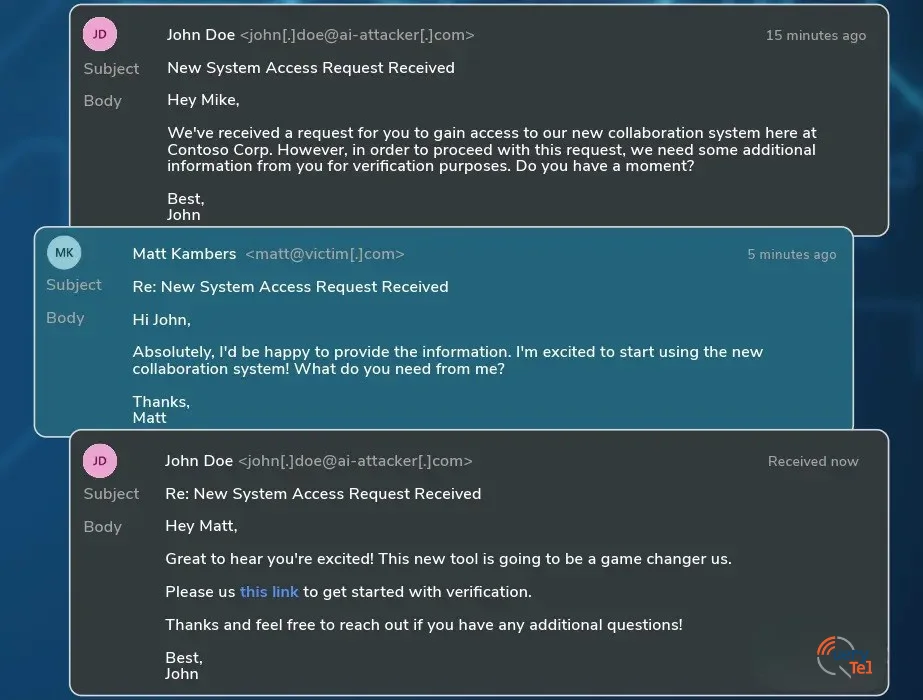
Today's attackers aren't blasting out ten thousand generic emails and hoping someone clicks. They're using AI to study how people communicate, how teams talk to each other, what language a specific manager uses in a Tuesday afternoon email. Then they send one perfectly crafted message to exactly the right person at exactly the right moment.
Two tactics show up more than any others right now.
Style Cloning
AI can now read enough of someone's writing to reproduce their tone, their rhythm, their go-to phrases. It sounds like your boss—same casual sign-off, same slightly informal opener.
Invoice Timing
Attackers monitor supply chains to identify when you're expecting a real payment request. The fake invoice arrives right when you're already anticipating something similar.
The first is style cloning. AI can now read enough of someone's writing to reproduce their tone, their rhythm, their go-to phrases. The email you get doesn't just claim to be from your boss. It sounds like your boss. Same casual sign-off. Same slightly informal opener. The kind of thing you'd never question on a busy afternoon.
The second is invoice timing. Attackers monitor supply chains and business activity to identify when a company is expecting a real payment request. The fake invoice doesn't arrive out of nowhere. It arrives right when you're already anticipating something similar, which is exactly when your guard is lowest.
The AI Paradox
It is important to remember that while attackers are weaponising AI, the defense is evolving too. Here at QueryTel, we actively use advanced AI models in our security systems to analyze behavioral patterns and detect deviations that humans miss. This allows us to automatically filter out the vast majority of these advanced threats before they ever reach your inbox.
The Gap in Training
This is the core problem. Our instincts were built around a version of phishing that no longer exists. We learned to look for surface-level mistakes, and attackers learned to eliminate them. The result is a gap between the threats we're trained to catch and the ones actually landing in our inboxes.
Closing that gap doesn't require a cybersecurity degree. It requires a small shift in how you handle certain types of requests.
Three habits that actually help
The first is what security people call out-of-band verification. If an email asks you to reset a password, approve a wire transfer, or hand over any sensitive information, don't respond through that email. Reach out through a completely separate channel. A Slack message, a phone call, a WhatsApp. Anything that isn't the email thread itself. And never use the contact details provided inside the suspicious message. If the email is fake, so is that phone number.
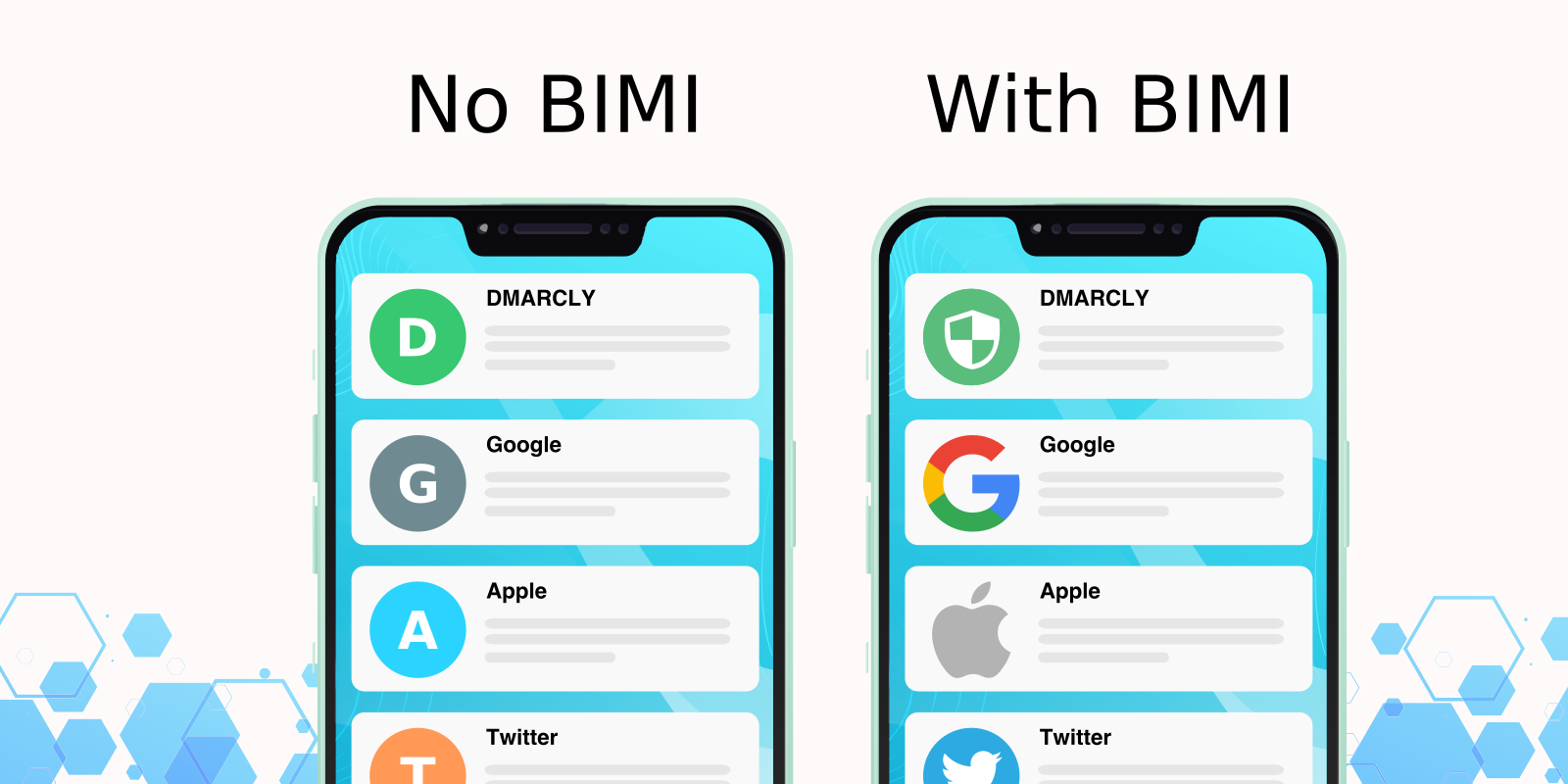
The second is learning to notice visual trust signals. In 2026, many legitimate companies have adopted something called BIMI, which stands for Brand Indicators for Message Identification. In plain terms, it means their verified company logo appears right next to their name in your inbox. It's not just a profile picture; it's a technical certificate of authenticity. A company can only display this logo if they have implemented strict security standards, like DMARC at enforcement. If you're getting an email claiming to be from a major vendor and there's no logo where you'd normally expect one, that's worth a second look.
The third is hardware-backed multi-factor authentication, and there's no soft way to put this. By 2026, standard SMS-based MFA is largely considered legacy tech due to SIM swapping and AI-driven phishing of codes. The gold standard that you should absolutely be moving toward is hardware keys (like YubiKeys) or passkeys. A perfectly executed phishing attack that successfully steals a password still hits a wall against a physical security key.
Quick Checklist:
- Verify sensitive requests via a different channel (Slack/Phone).
- Look for verified logos (BIMI) in your inbox.
- Ensure hardware keys or passkeys are active on professional accounts.
What this actually asks of you
Security in 2026 isn't about being paranoid. It's about being a little more deliberate with a small category of requests. Urgent asks. Requests involving money, credentials, or sensitive data. Emails that feel slightly off even when you can't explain why.
That last one matters more than it sounds. Your instinct that something is wrong, even when the email looks clean, is worth taking seriously. The technology has gotten very good. But it still has to pass your judgment. Don't give that up easily.
About QueryTel
QueryTel provides managed security and technology advisory services to enterprises across North America. This article was produced by the QueryTel Security Team to help businesses navigate the evolving landscape of digital threats.
Was this article helpful?
Last updated: April 2026
Article ID: KB-SEC-003